
Lumoshive - We Build Digital Products That Move Businesses ForwardLumoshive - We Build Digital Products That Move Businesses Forward
Solutions
ProjectsTechnology
Academy
Talk to Us
Back to Blog

Still Running on Paper?

Tell us what slows your team down.
We'll reply within one working day with a first idea and an estimate.

Explore Our WorkGet In Touch
Whatsapp
Instagram
Facebook
LinkedIn
X
Lumoshive
Lumoshive

Pioneering enterprise-grade digital infrastructure, high-concurrency systems, and talent acceleration across Southeast Asia.

COMPANY

  • About Us
  • Our Team
  • Careers
  • Contact Us
  • Blog

SOLUTIONS

  • Custom Software Development
  • Digital Transformation
  • IT Resources & Dedicated Team
  • AI & Cloud Solutions

PRODUCTS

  • LIVRE
  • SecureBox
  • Lumoshive Academy

OFFICE LOCATIONS

Jakarta HQ

Centennial Tower, 29th Floor Unit D & EJl. Jend. Gatot Subroto Kav 24-25Jakarta Selatan, 12930, Indonesia

Jakarta General Office

Green Garden Blok Z4 No.15, RT.14/RW.8, Jakarta Barat, 11520, Indonesia

Smart Theme Switch ~ Framer Component | Lumoshive

Smart Theme Switch ~ Framer Component

Tips & Insight10 min read•Nov 3, 2026, 08:21 AM•Created by Admin
Smart Theme Switch ~ Framer Component

Overview

A seamless theme switching experience is crucial for modern high-converting websites. This article explores how to architect a lightweight, zero-flicker theme toggle component with persistent local storage and CSS variables.

Introduction

Implementing dark mode isn't just about inverting hex colors. It requires thoughtful consideration of contrast ratios, color hierarchy, and state persistence. With our custom Framer component, designers can integrate intelligent theme switching with zero latency.

Step 1: Define CSS Custom Properties

Establish clear semantic design tokens for neutral, surface, text, and accent colors across both light and dark modes.

Step 2: Handle Anti-FOUC (Flash of Unstyled Content)

Inject an inline blocking script in the document head to read localStorage before the DOM renders, ensuring zero layout shift or theme flickering.

Always respect user system preferences (prefers-color-scheme) as the default fallback when no explicit user toggle state has been recorded.

More Blogs

View All Blogs
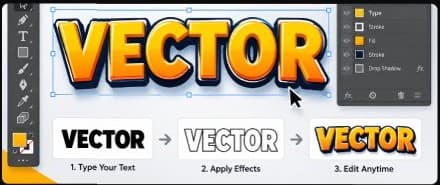
How to Create an Editable Vector Text Effect in Adobe Illustrator
Tips & Insight10 min read

How to Create an Editable Vector Text Effect in Adobe Illustrator

Learn how to create a stunning editable vector text effect using the Appearance and Graphic Styles panels in Adobe Illustrator. Keep text editable while applying layered gradients, drop shadows, and 3D strokes.

Nov 3, 2026, 08:21 AM
Read More
Mastering the Basics of Responsive Web Design
Tips & Insight12 min read

Mastering the Basics of Responsive Web Design

Explore the fundamental principles of responsive web design to ensure your website looks great on all devices. This guide covers media queries, flexible grids, and fluid images for modern screens.

Nov 3, 2026, 08:21 AMRead More
Test 1
Activity1 min read

Test 1

Nov 3, 2026, 09:13 AMRead More